How to Address Certified Mail: Complete Guide (2025)
Skip the Addressing Hassle
Upload your document and we'll handle addressing, certified mail labels, and mailing for you. Just enter the recipient's address at checkout.
Send Certified Mail OnlineAddressing certified mail correctly ensures your important documents arrive at the right destination and your tracking works properly. This guide shows you exactly how to address certified mail envelopes, where to place labels, and how to avoid common mistakes that can delay delivery.
If you need to mail a physical letter without visiting the post office, you can also send letter online.
📋 Table of Contents
Certified Mail Envelope Layout
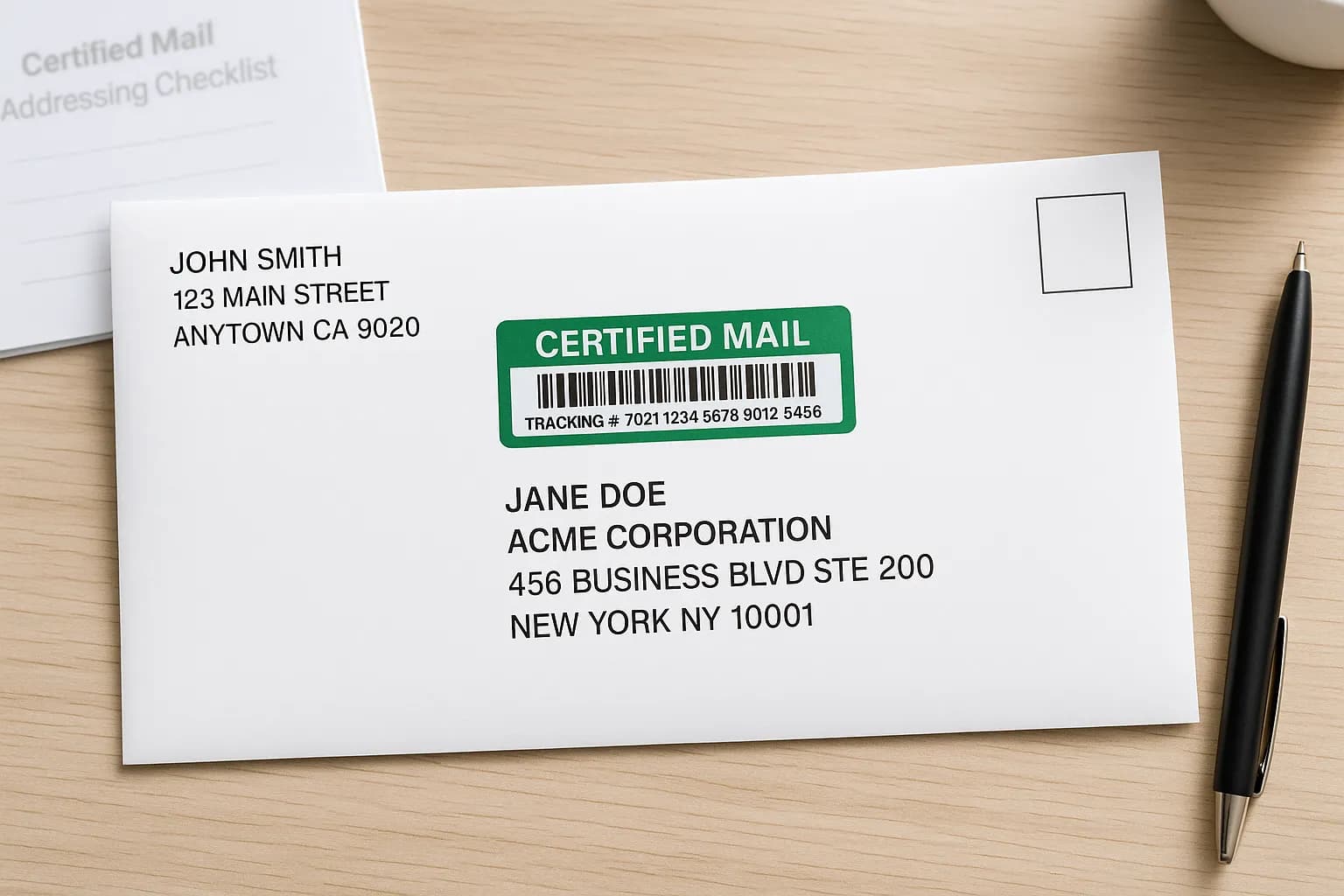
Here's how a properly addressed certified mail envelope should look:
JOHN SMITH
123 MAIN STREET
ANYTOWN CA 90210
[STAMP]
CERTIFIED MAIL® RECEIPT
Tracking #: 7021 1234 5678 9012 3456
JANE DOE
ACME CORPORATION
456 BUSINESS BLVD STE 200
NEW YORK NY 10001
Recipient Address Format
The recipient's address goes in the center of the envelope. Follow USPS addressing standards:
📋 Standard Format
RECIPIENT NAME
COMPANY NAME (if applicable)
STREET ADDRESS APT/STE/UNIT #
CITY STATE ZIP CODE
Use ALL CAPS for best machine readability. No punctuation needed.
✅ Correct Examples
JOHN DOE
789 OAK AVENUE
CHICAGO IL 60601
JANE SMITH
ABC COMPANY
100 CORPORATE DR STE 500
DALLAS TX 75201
MIKE JOHNSON
250 MAPLE ST APT 4B
BOSTON MA 02101
❌ Incorrect Examples
John Doe ← Mixed case
789 Oak Ave. ← Unnecessary punctuation
Chicago, IL 60601 ← Comma not needed
JANE SMITH
100 CORPORATE DR
SUITE 500 ← Suite on wrong line
DALLAS TX 75201
💡 Address Tips
- • Use standard abbreviations: ST, AVE, BLVD, DR, APT, STE
- • Put apartment/suite on the street line: 123 MAIN ST APT 4
- • Use ZIP+4 when known: 90210-1234 (helps with delivery)
- • Verify address beforehand: Use USPS address validation tool
Return Address Placement
Your return address goes in the upper left corner of the envelope:
📍 Return Address Format
YOUR NAME
YOUR STREET ADDRESS
YOUR CITY STATE ZIP
📋 Why Return Address Matters for Certified Mail
- • Required for returns: If undeliverable, mail comes back to you
- • Tracking records: Links the mailing to your address
- • Legal proof: Shows you as the sender in disputes
- • Return receipt delivery: Green card returns to your address
Certified Mail Label Placement
The certified mail label (PS Form 3800) must be properly attached to the envelope:
📍 Where to Place the Label
- • Above the recipient address: Most common placement
- • Upper right area: Below postage, but above address
- • Don't cover: Never cover the recipient address or return address
- • Barcode visible: The barcode portion must be readable
✅ Label Do's
- • Peel and stick firmly—press all edges
- • Make sure barcode is flat and readable
- • Fill in recipient address on the label receipt portion
- • Keep the detachable receipt for your records
❌ Label Don'ts
- • Don't tape over the barcode
- • Don't fold or crease the label
- • Don't place on envelope seams
- • Don't cover the recipient's address
Return Receipt Attachment
If you're using Return Receipt service (recommended), here's how to attach it:
📬 Physical Return Receipt (PS Form 3811)
- Fill in recipient's name and address on the green card
- Write the article number (from certified mail label)
- Check the type of service box
- Peel off the adhesive backing
- Attach to the back of the envelope
📱 Electronic Return Receipt
- • No physical card needed
- • Signature image available online
- • Email notification of delivery
- • Costs slightly less than physical
- • Select at post office counter or online
Learn more: PS Form 3811 (Return Receipt) Guide
Step-by-Step Instructions
Follow these steps to address your certified mail correctly:
- 1Write your return address in the upper left corner of the envelope
- 2Write the recipient's address centered on the envelope in USPS format
- 3Fill out the certified mail label (PS Form 3800) with recipient address
- 4Attach the certified mail label above the recipient address or upper right
- 5If using Return Receipt: Fill out green card and attach to back of envelope
- 6Apply postage in the upper right corner (or pay at counter)
- 7Keep the receipt portion of the certified mail label for your records
- 8Mail at post office counter to get date stamp on receipt
Common Mistakes to Avoid
Avoid these common certified mail addressing errors:
❌ Addressing Mistakes
- • Missing apartment/suite number — Mail returned or delayed
- • Wrong ZIP code — Sent to wrong post office
- • Illegible handwriting — Use printed labels if handwriting is unclear
- • Missing return address — Can't return if undeliverable
- • Outdated address — Verify current address before mailing
❌ Label Mistakes
- • Covering the recipient address with the label
- • Not pressing label firmly — Falls off in transit
- • Writing on barcode area — Scanner can't read it
- • Losing the receipt — Keep it for proof of mailing
- • Not filling in label completely — Missing information on record
Frequently Asked Questions
How do I address a certified mail envelope?
Address certified mail the same as regular mail: recipient name, street address, city, state, and ZIP code centered on the envelope. Place your return address in the upper left corner. The certified mail label goes above the recipient address or in the upper right area below the postage.
Where do I put the certified mail label?
Place the certified mail label (PS Form 3800) either above the recipient's address or in the upper right area of the envelope, below where the postage goes. Make sure not to cover the recipient's address or your return address with the label.
Do I need to write "CERTIFIED MAIL" on the envelope?
No, you don't need to write "CERTIFIED MAIL" on the envelope. The certified mail label (green form) identifies it as certified mail. Just address the envelope normally with recipient and return addresses.
Can I print address labels instead of handwriting?
Yes, printed address labels are acceptable and often preferred for clarity. Whether typed or handwritten, the address must be legible. Printed labels reduce errors and look more professional. Just make sure labels are firmly attached.
Where does the return receipt go?
If using a physical return receipt (PS Form 3811 - the green card), it attaches to the back of the envelope. Fill out the recipient's address on the green card, peel off the backing, and stick it firmly to the back. Electronic return receipt doesn't require physical attachment.
Do I need to include apartment numbers?
Yes, always include apartment, suite, or unit numbers when applicable. Put it on the same line as the street address (e.g., "123 MAIN ST APT 4") or on a separate line directly below. Missing apartment numbers can cause delivery failures or delays. See our apartment addressing guide.
Can I drop certified mail in a mailbox, or do I have to go to the post office?
You can drop certified mail in a blue collection box or give it to your mail carrier, but you won't get a dated receipt proving the mailing date. For legal proof of mailing with a postmark, take it to the post office counter where a clerk will scan and stamp your receipt.
Let Us Handle the Addressing
Upload your document and we'll take care of addressing, certified mail labels, and mailing—just enter the recipient address at checkout.
Send Certified Mail Online📚 Related Guides
Last updated:
Tags: how to address certified mail, certified mail address format, certified mail envelope, address format for certified letter, certified mail label placement, how to fill out certified mail label, where to put certified mail sticker